Holo Keyboard
Holographic keyboard and shortcut deck
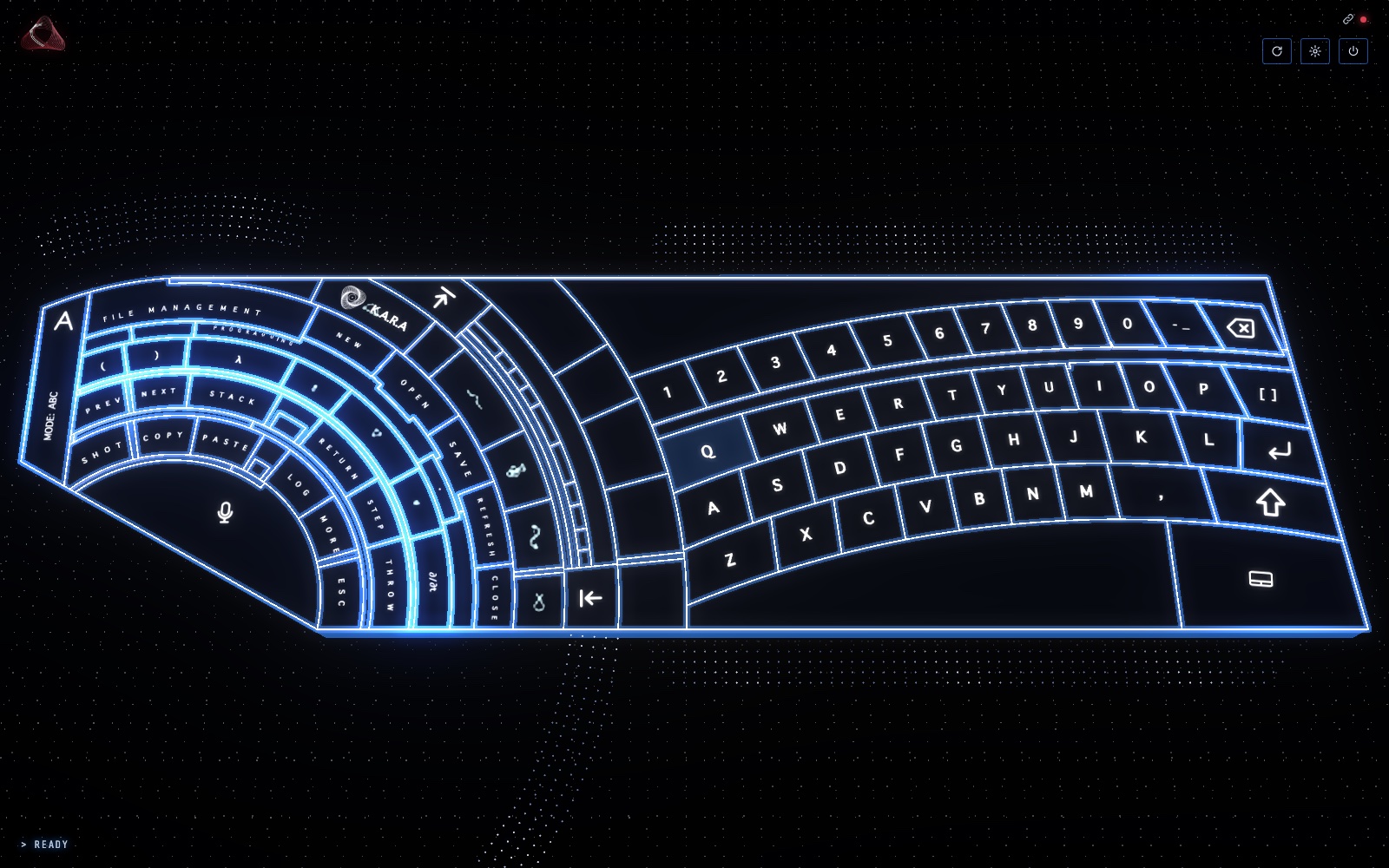
A 3D holographic keyboard on a tablet that types and controls a Mac: a curved typing arc, a fan of shortcut keys you assign with a long press, a space bar that turns into a trackpad, camera hand tracking for pointing and gestures, and a key that calls K.A.R.A. Layout after a design by Paul Elder.
GoalTurn a spare tablet into a second keyboard you can shape around your own work.
The story
- The spark
A desk keyboard does one job. We wanted a second one that could change shape around the work: shortcuts, apps, gestures and a voice, all in reach.
- The idea
Turn a spare tablet into a holographic keyboard that talks to the Mac over Wi-Fi, with every key yours to reassign.
- What we built
A 3D keyboard drawn in the browser, a small Python bridge that presses the keys on the Mac, and a menu-bar app that pairs the tablet with a QR code. It types, runs shortcuts, scrolls like a trackpad, follows your hand through the camera, and wakes K.A.R.A with one key.
What it does
- Two halves, one deck
The right arc is a full typing keyboard. The left fan holds shortcut keys for files, editing and code, plus a mic key and a K.A.R.A key. A strip on the far left switches the labels between letters, symbols and app icons.
- Every key is yours
Long-press any key to give it a new job: a keyboard shortcut, an app to open, a web address, a block of text or a small script. It saves straight away and stays that way.
- App mode
Switch the deck to apps and the keys show your real Mac app icons, the ones in your Dock first. One tap opens or brings forward the app.
- A trackpad in the space bar
The wide bar under the keys works like a Mac trackpad: move, click, two-finger scroll and right-click, pinch to zoom and swipe between desktops.
- Hand tracking
With the camera on, your hand becomes the pointer. Pinch and hold to click, wave or draw a circle for commands, and close then open your fist to see every window. A gesture library in Settings shows each move as a short animation.
- A key for K.A.R.A
One key brings K.A.R.A forward on the Mac; the mic key starts a spoken conversation with her, with a ring that turns while she listens.
- Made to sit on a desk
The deck tilts and sways a little, keys sink when pressed, and it comes in three colourways. After a minute and a half it sleeps, and wakes with a sweep of light when touched. It installs to the tablet's home screen like an app.
- Pairs in one scan
A small menu-bar app on the Mac runs the bridge, shows a QR code for the tablet, says whether it's connected and can start at login.